How to Choose a Heated Display for a Concession Stand

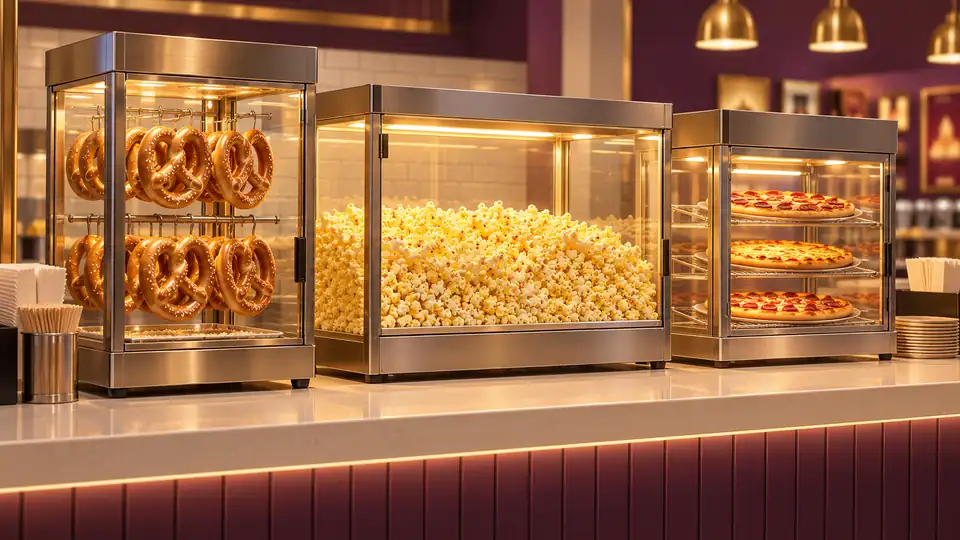
Choose a heated concession display by the food you will hold, how it will be portioned, and where customers and staff need access. Then check usable shelves or racks, holding conditions, power, and cleaning. A clear cabinet is not automatically suitable for every food, and a display that holds finished food is not necessarily cooking equipment.
Once the service format is clear, compare commercial heated food displays by the food arrangement and access they support. Start with the intended menu rather than the largest visible cabinet.
Write Down What the Display Must Do
List the foods held at the same time, how they arrive at the counter, and how staff will serve them. Whole products, slices, loose snacks, and covered portions use space differently.
Check whether the food is cooked elsewhere, cooked in the same appliance, or transferred from a separate holding stage. Do not use a similar-looking cabinet to infer a heating or cooking function that is not documented for the unit.
| Food format | Layout question | Operating question |
|---|---|---|
| Pretzels | Do racks or hooks fit the actual product and portioning method? | What holding environment and loading arrangement does the equipment specify? |
| Finished popcorn | Can staff load, scoop, and remove residue conveniently? | Is the appliance a holding cabinet, a popper, or a combined design? |
| Pizza | Will it hold whole pies, trays, slices, or boxed orders? | Which conditions and containers are intended for that specific holding setup? |
Separate Product Visibility From Usable Capacity
A cabinet’s external dimensions do not tell you how the loaded food will fit. Check rack spacing, pan dimensions, door clearance, and any space required around the food or shelves.
Consider what customers can actually see and how a worker will reach the next item without disturbing the rest. Capacity that requires awkward handling may not help the busiest part of service.
For Pretzels, Check the Rack and Holding Method Together
Count the products needed between replenishment runs and check their size against the support arrangement. A rotating rack, fixed shelf, and hanging display create different loading and serving tasks.
Compare pretzel warmers around that arrangement. Check the complete model’s documented holding method rather than assuming every glass display adds humidity or uses the same water routine.
For Popcorn, Distinguish Making From Holding
A popcorn popper produces food; a holding cabinet handles finished popcorn. Some equipment combines functions, while other products are only serving or holding formats.
Review popcorn warmer and machine formats by what each unit actually does. Keep the cooking mechanism, holding area, and serving access separate in the comparison so a production feature is not mistaken for holding capacity.
Plan access to the scoop, the loading point, and the area that collects crumbs or residue. The display should fit the staff workflow as well as the food volume.
For Pizza, Specify the Serving Stage
Holding slices on trays, holding whole pies, and moving boxed orders are different tasks. Check the container or rack format and whether the equipment actively adds heat.
Compare pizza warming formats for the counter by the intended stage. A passive delivery bag does not become a heated display because it appears in a broad pizza-warming comparison.
Check Temperature and Moisture Features for the Menu
Manufacturers use different combinations of heat, airflow, water reservoirs, vents, and controls. Some cabinets offer humidity adjustment; others do not. Check the actual model and the foods it is intended to hold.
A single setting is not automatically suitable for a mixed menu. Consider the food’s desired texture alongside the temperature-control procedure required for the operation. Check the food itself rather than treating the air display as a measurement of every item.
Measure the Installed Station
Allow for open doors, staff reach, customers, cords, and the installation clearances in the manual. Verify the model’s electrical requirements against the actual location and other equipment sharing the supply.
Use the commercial food warmer selection guide to organize the capacity, supply, and service-flow checks. If the display is at a pickup window, include the movement of orders through that window in the plan.
Plan the End of Service Before Buying
Check access to shelves, racks, glass, seals, and any water-handling parts. Determine which parts come out and how the unit is cooled, emptied, and cleaned according to its instructions.
The guide to commercial warmer cleanup and maintenance helps evaluate that routine. Choose a display that supports the complete job: loading prepared food, presenting it, serving it, monitoring it, and leaving the equipment clean for the next shift.

- Graham
Keeping food warm isn't always as simple as it sounds. From family dinners to large catered events, different settings call for different equipment. Graham Ellis approaches these choices with an eye for the details that matter, including temperature control, serving capacity, ease of cleaning, and overall convenience. His contributions to Best Food Warmers aim to make the buying process less confusing and help readers find solutions that fit the way they serve food.
- How Do Food Warmers Work? November 7, 2026
- How Long Can You Keep Food in a Warmer? November 6, 2026
- Can You Reheat Food in a Food Warmer? November 5, 2026
- What Temperature Should a Food Warmer Be Set At? November 4, 2026
- Best Pizza Warmers: 9 Picks in 2026 November 3, 2026